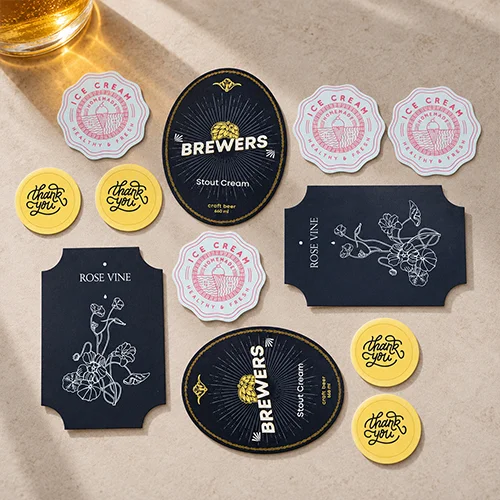
FREE Delivery on orders over £75
FREE Artwork Check with Order
From £12.60 for 25 — default options and most popular quantities shown; choose options to see live prices.
QTY | Same Day Express | Faster | Fast |
|---|---|---|---|
| 25 | £17.01 | £13.86 | £12.60 |
| 50 | £17.22 | £14.03 | £12.75 |
| 100 | £17.45 | £14.22 | £12.92 |
| 250 | £22.52 | £18.35 | £16.68 |
| 500 | £27.60 | £22.49 | £20.44 |
| 750 | £32.20 | £26.23 | £23.85 |
| 1000 | £35.91 | £29.26 | £26.60 |
| 1500 | £43.55 | £35.49 | £32.26 |
Price ex. VAT, excludes delivery
Multiple designs: If you want to print different designs, you'll need to add a quantity to your basket for each design.
Custom Stickers & Labels
- High-quality stickers in a range of materials, sizes and shapes
- Easy online ordering with fast turnaround and delivery options
- Small quantities available from 25 stickers on sheets
Quantity is the total number of stickers, not sheets or rolls.
Product Overview
Custom Stickers and Labels
Custom Stickers for Packaging, Product Labels and Giveaways
Custom stickers and labels from instantprint put your brand on boxes, bags, jars and bottles. Seal mailer boxes so every order arrives looking deliberate. Label products, prices and dates without a wobbly handwritten tag. Add a free sticker to every parcel, and your logo ends up on laptops and water bottles. Hand them out at events, where free stickers vanish faster than the biscuits.
Custom Sticker Sizes, Materials and Finishes
| Shapes | Circle, square, rectangle or custom |
|---|---|
| Circle SizesDiameter |
|
| Square SizesWidth x height |
|
| Rectangle SizesWidth x height |
|
| Individual Sticker Sizes |
|
| Custom SizeWidth x height | Sheets and rolls: 20 x 20mm to 206 x 293mm Individual stickers: 40mm on the shortest edge, up to 206 x 293mm |
| Material |
|
| Roll Options |
|
| Quantities | Total stickers, not sheets or rollsSheets and individual stickers from 25. Rolls from 100. |
| Multiple Designs | Add each design to your basket separately |
Sticker Sheets, Rolls or Individual Stickers: Which Should You Choose?
The right sticker format depends on how you'll hand out or apply your stickers.
- Sticker sheets
- several identical stickers on each sheet, delivered in an envelope. Good for packing into orders, handing out or applying by hand a few at a time.
- Labels on rolls
- labels supplied on a roll for hand or machine application, with your choice of sticker gap, leading edge and winding direction. Made for labelling products in volume.
- Individual stickers
- each sticker supplied separately and shaped to your design, on White or Transparent Plastic Polyprop. Use them for giveaways, merch and freebies in parcels.
Whichever you pick, you're ordering stickers, not sheets or rolls. The maths is on us.

FAQs
Custom Stickers & Labels FAQs
Last updated
No answers match that search. Try a different word, or ask our team on Live Chat.
If I order 100 stickers, is that 100 sheets?
Ordering 100 stickers from instantprint gets you 100 individual stickers, not 100 sheets or reels. The quantity you choose is always the number of stickers, printed across as many sheets or reels as your size needs. instantprint lays them out to cut waste, so the number of sheets depends on your sticker size and shape. The minimum is 25 stickers per design.
How many stickers fit on one sheet?
The number of stickers that fit on one instantprint sheet depends on the size you choose. 37mm circles and 37mm squares fit 35 per sheet, 45mm squares fit 24, 50mm circles fit 15, and 76mm and 88mm circles fit 6. Rectangles fit 12 at 80 x 45mm, 9 at 88 x 63mm, and 4 at 110 x 75mm or 140 x 94mm. Custom sizes are laid out to reduce waste, so the count varies.
What sizes do custom stickers come in?
Custom stickers from instantprint come in set sizes of 37mm, 50mm, 76mm and 88mm circles (measured across the diameter), 37mm and 45mm squares, and 80 x 45mm, 88 x 63mm, 110 x 75mm and 140 x 94mm rectangles. Set-size squares and rectangles have 2mm rounded corners. For anything else, choose Custom Size and enter your own dimensions, from 20 x 20mm up to 206mm wide by 293mm high, with square or rounded corners. Individual stickers must measure at least 40mm on their shortest edge.
Can I get stickers cut to the shape of my logo?
instantprint can cut stickers to the shape of your logo, following the outline of your design, at any size from 20 x 20mm up to 206mm wide by 293mm high, or at least 40mm on the shortest edge for individual stickers. The online design tool doesn’t work with custom shapes, so upload your own artwork after adding your stickers to the basket. Your shows the cut line, so check it before you approve. Custom shapes are available on Next Day, Faster and Fast.
Should I choose sticker sheets, reels or individual stickers?
Choosing between sticker sheets, reels and individual stickers depends on how you’ll use them. Choose sheets for smaller runs you’ll peel by hand, from 25 stickers per design. Choose reeled labels for 100 or more identical labels, applied by hand or with a labelling machine. Choose individual stickers to hand out at events: each is cut separately on its own split backing, at least 40mm on its shortest edge, from 25 per design, on white or transparent . instantprint prices every format by total sticker count.
What’s the minimum number of stickers I can order?
The minimum number of stickers you can order from instantprint is 25 per design on sheets, 25 per design for individual stickers and 100 per design on reels. Nothing lower than the minimum shown online can be ordered, so single test stickers aren’t available. To see and feel the materials first, order instantprint’s free sample pack, which includes a variety of stickers.
How quickly can I get custom stickers?
Custom stickers from instantprint can arrive the next working day if you approve your by the 5pm Next Day cut-off. Faster takes 1 working day and Fast takes 4 working days; for either, approve by the 6:30pm Faster or Fast cut-off. Delivery dates count from proof approval, not upload, and extended delivery areas add 1 working day. Your basket and confirmation email show the exact date.
Can I get stickers delivered tomorrow?
You can get instantprint’s custom stickers delivered tomorrow if you approve your by the 5pm Next Day cut-off. Next Day covers sheets and reels on 4 materials (semi gloss paper, smooth uncoated paper, premium textured paper and white ), including custom shapes. Transparent and silver stickers and lamination need Faster or Fast, and foil and Spot UV need Fast. You can also order from Next Day Stickers.
Which sticker material should I choose?
The sticker material to choose depends on where the sticker will go, and instantprint offers 6:
- semi gloss paper for everyday labels, packaging and envelopes.
- 70gsm smooth paper for stickers you want to write on.
- 90gsm premium textured paper for a hammered, handmade-style finish.
- 55gsm white (40gsm on reels) for bottles, jars and handled items.
- 52gsm transparent polyprop for a clear, no-label look on glass and plastic.
- 47gsm silver polyprop for a metallic base under your design.
What’s the difference between semi gloss paper and polyprop stickers?
The difference between semi gloss paper and polyprop stickers is that paper suits dry use, while polyprop is a splash resistant plastic film. instantprint’s semi gloss paper is coated and , with a light shine for labels, envelopes and dry packaging. 55gsm white suits bottles, jars and items that get handled or chilled, and works from −40°C to 80°C. Paper is easier to write on.
Are your stickers waterproof, and can I use them outside?
instantprint’s stickers aren’t waterproof and aren’t made for outdoor use. The 3 materials (55gsm white, 52gsm transparent and 47gsm silver) are splash resistant, so they cope with splashes and handling indoors and work from −40°C to 80°C. Keep paper stickers dry. For signs that go outside, look at instantprint’s signage range.
What’s the best sticker for bottles and jars?
The sticker to choose for bottles and jars is instantprint’s 55gsm white , or 52gsm transparent polyprop for a clear, no-label look. Both are splash resistant plastic films with a permanent adhesive that work from −40°C to 80°C. On jars that stay dry, premium textured paper adds a handmade feel. For food products, the stickers are suitable for the outside of packaging, not direct contact with food.
Can I put different designs on the same sheet?
Different designs can’t go on the same instantprint sheet or reel, because every sticker on it must be the same design. For several designs, add each one to your basket as a separate item with its own quantity, at least 25 per design on sheets. You can still check out all your designs in 1 order. Sequential numbering and variable data, such as a unique name or QR code on each sticker, aren’t available.
How do reeled labels work?
Reeled labels from instantprint come wound on a roll, ready to apply by hand or with a labelling machine, from 100 labels per design. You choose the gap between labels, from 2mm to 10mm, which edge leads off the reel, and whether the labels are wound inside or outside. The number of labels on each reel can’t be chosen. White on reels is 40gsm rather than the 55gsm used on sheets.
Can you print white on clear stickers?
instantprint can print white on clear stickers: white ink is available on 52gsm transparent only, so white areas of your design print as white instead of staying clear. Anywhere without ink stays see-through. The adhesive is on the back only, so for a sticker that faces out through a window from the inside, choose window stickers, which can be applied facing either way. Foil isn’t available on transparent stickers.
Can I add lamination, foil or Spot UV to my stickers?
You can add matt, gloss, soft touch or rough touch to instantprint’s stickers on the Faster and Fast turnarounds. Gold or silver and single sided are Fast only, so allow 4 working days of printing plus delivery, and both need matt or soft touch lamination. Foil works on semi gloss paper or white . Spot UV works on white or silver polyprop only.
How do I set up my sticker artwork?
Set up your sticker artwork at the finished sticker size as a PDF in , at , with fonts or . Add 3mm of bleed on every side, meaning your background runs 3mm past the cut line, and keep text and logos inside a 3mm . instantprint’s free artwork check reviews every file. The sticker set-up guide walks you through each step.
Why can I see a white border or cut line on my proof?
A white border or cut line on your instantprint shows where each sticker will be cut and the 3mm , and those lines aren’t printed. If a white edge shows inside the cut line, your background doesn’t reach the edge, so extend it 3mm past the cut line as . Avoid a thin border near the edge of your design, because slight movement during cutting can make it look uneven.
How much do custom stickers cost, and do prices include VAT?
The cost of instantprint’s custom stickers depends on the format, shape, size, material, finish, turnaround and total quantity, and the price per sticker falls as the quantity rises. Prices in the table don’t include VAT or delivery: switch on the VAT toggle to see prices with VAT. Choose your options to see live prices, and your basket shows the full total before you pay.
How much is delivery on stickers?
Delivery on instantprint stickers is calculated in your basket, and standard delivery is free on orders over £75. Standard delivery is DPD tracked, with an upgrade to pre-noon delivery, and Saturday delivery if it shows as an option in your basket. instantprint delivers to UK addresses only, and extended delivery areas take 1 extra working day.
How are my stickers packaged?
Your instantprint stickers are packaged to suit the format you order. Sticker sheets arrive in a book wrap mailer, and reeled labels come in a box with bubble wrap. Individual stickers (decals) come in a padded bag, or in a box with bubble wrap for larger quantities. instantprint’s packaging is widely recyclable, including the plastic.
How can I pay, and can I get a quote?
You can pay for instantprint stickers by Visa, Visa Electron, Mastercard, Maestro, American Express or PayPal. To get a quote, add your stickers to the basket and use Save as Quote, so you can come back to it later. Add any discount code in the basket’s voucher field; first-order offers have eligibility rules. For large or regular orders, speak to an account manager.
How are custom stickers printed?
Custom stickers are printed by instantprint on an HP Indigo 6K+ digital press, then cut on an ABG DigiLase Duo laser cutter with twin 400W laser heads. and Spot UV are added on a Dual Bar DigiJet, and an integrated laminator applies lamination in the same process. Store finished stickers somewhere cool and dry, because extreme heat or cold affects the adhesive.
Can I recycle my stickers?
Your instantprint stickers can’t be recycled on any material, because of the permanent adhesive on the back. The , 78gsm and 90gsm paper stocks are , so the paper comes from responsibly managed sources. instantprint’s packaging is widely recyclable, including the plastic, so you can recycle that as usual.
What sticker options can’t you print?
The sticker options instantprint can’t print are embossed, holographic or reflective stickers, black or gold base materials, removable adhesive, cut-outs inside a sticker, printing on the backing, and different designs on 1 sheet. Every sticker has a permanent adhesive, so for a window graphic you can peel off and reposition, choose window clings. For a gold look, add gold tones to your artwork on 47gsm silver .
Still not sure? Talk to our team on Live Chat. We can check your artwork, help you choose between sheets, reels and individual stickers, and confirm which materials and finishes work together.
Chat to our team
Quantity Calculator
Sticker Quantity Guide
Your Quantity Is the Number of Stickers
The quantity you choose in the price table is the total number of stickers you'll receive, not the number of sheets or rolls. Order 500 and you get 500 stickers.
How many sheets or rolls those stickers come on depends on your sticker size. Use the calculator to work it out.
Sheets
Set by sizeEach sheet holds a set number of stickers. Smaller stickers fit more to a sheet, so you get fewer sheets.
Rolls
Set by size and materialYour stickers are shared evenly across your rolls. Larger orders and thicker materials need more rolls.
Work Out Your Sheets or Rolls
Enter the quantity from the price table. That's the number of stickers you'll receive.
Stickers per Sheet
How many stickers fit on one sheet for each standard size.
| 37mm Circle | 35 per sheet |
|---|---|
| 50mm Circle | 15 per sheet |
| 76mm Circle | 6 per sheet |
| 88mm Circle | 6 per sheet |
| 37mm Square | 35 per sheet |
| 45mm Square | 24 per sheet |
| 80 × 45mm | 12 per sheet |
| 88 × 63mm | 9 per sheet |
| 110 × 75mm | 4 per sheet |
| 140 × 94mm | 4 per sheet |
How We Work It Out
| Quantity | The number of stickers you'll receive, whether they come on sheets or rolls. |
|---|---|
| Sheets | Your quantity divided by the number of stickers per sheet, rounded up to a whole sheet. |
| Rolls | Your stickers are shared evenly across your rolls, so your total may be a few more than you ordered. |
| Custom Sizes | The calculator gives an approximate number, based on how our standard sizes fit. |
Still Got Questions? Talk to our team on Live Chat. We're happy to help with sizes, materials or anything else about your order.
Chat to our teamArtwork & Templates
Artwork Help
Artwork Made Easy
1. Set up your artwork in your own design software at the exact custom size you need, then add a 3mm bleed and a 3mm safe zone on all sides. This ensures your design prints edge-to-edge and no important details are lost when the stickers are trimmed.
2. Upload your design after adding your stickers to the basket, our proofing tool checks for common issues and generates a proof for you to approve.
3. If you encounter any issues with your artwork that you can't resolve online, chat with our team for a quick resolution.
Extra Help
Print Specifications
For the best print result, use these specification guidelines:
Resolution: 300dpi
Print: Full Colour
Colour: CMYK
Format: PDF
Fonts: Outlined or Embedded
Bleed: 3mm
Safe Zone: 3mm
Custom Size & Shape
Custom Size and Shape
Choose Your Size and Shape
Make your stickers the exact size you need, or have them cut to a circle, an arrow or an outline around your design.
Custom Size
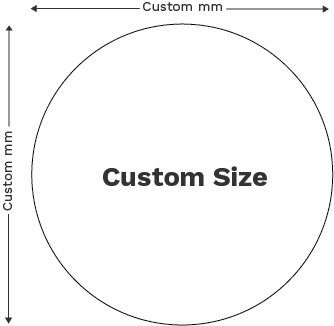
Width × heightSelect Custom Size and enter your width and height in millimetres.
Custom Shape
Circles, arrows, outlinesSelect Custom Shape, then measure your shape at its widest and tallest points and enter those as your size.
How to Set Up Your Cut Line
A cut line is the outline we follow to cut your stickers to shape. Our online proofing tool can create one for you, or you can add your own in Adobe Illustrator.
Automatic Cut Line
- Upload your artwork to the online proofing tool.
- The tool automatically creates a cut line around your design.
- Check and approve the cut line in your .
Manual Cut Line
- In Adobe Illustrator, create a separate layer named Cutter.
- Draw the outline where you want your stickers cut, using a stroke with no fill.
- Set the stroke colour to C: 0, M: 100, Y: 0, K: 0.
- Name the colour swatch Cutline and set it to , not Spot.
Before You Upload
| Measuring | Enter width and height in millimetres. For custom shapes, use the widest and tallest points. |
|---|---|
| Separate Designs | We can’t cut multiple separate stickers from one larger sheet. |
| Manual Cut Line | Stroke only, on a layer named Cutter, in a Process swatch named Cutline. |
Not Sure About Your Shape? Talk to our team on Live Chat. We can help you set up your size, shape and cut line.
Chat to our team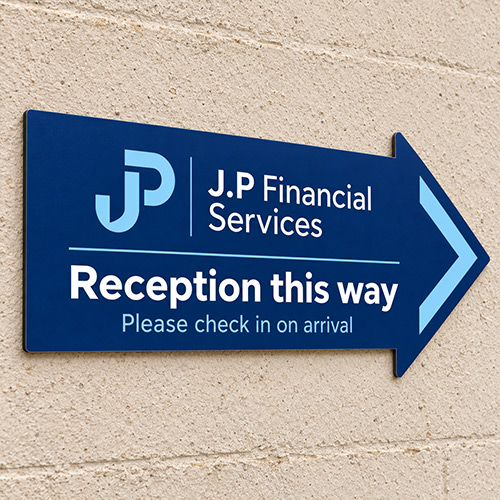
Foil & Spot UV
Foil and Spot UV Embellishment Guide
Make Details Shine
Add or to highlight part of your sticker design, such as a logo or a special detail like a border. Embellishment is only available with matt or soft touch .
Foil
Metallic shineGives your chosen areas a reflective metallic finish that catches the light.
Read the foil artwork guideSpot UV
Clear glossAdds a clear, glossy coating that stands out against the matt or soft touch finish around it.
Read the spot UV artwork guideHow to Set Up Your Artwork
Upload 2 files: your finished sticker design, and a separate embellishment file showing only the areas you want embellished.
- Create a copy of your finished design at the same size, so the embellished areas line up exactly.
- Fill the areas you want embellished in bright orange and delete everything else, leaving the background transparent.
- Name the file after your finish, such as Foil.pdf.
- Upload both files: your finished design and your embellishment file.
Before You Upload
| Cut Line | Keep embellishment at least 3mm inside the cut line. |
|---|---|
| Text Size | Make embellished text at least . |
| Embellishment File | Bright orange areas only, on a transparent background. |
| Lamination | Matt or soft touch only. |
Not Sure Your File Is Right? Talk to our team on Live Chat. We can check your embellishment file before you order.
Chat to our team
Delivery
Custom Sticker & Label Delivery
When Will My Stickers Arrive?
Choose a turnaround when you order. The delivery date shown next to each option already includes printing and delivery. The artwork cut-off is 5pm for Next Day and 6:30pm for Faster and Fast; if you approve your artwork after it, your delivery date moves back. Working days are Monday to Friday, excluding bank holidays.
Next Day
Printed same dayOrder and approve your artwork before 5pm. We'll print and dispatch your stickers the same day, so they're with you the next working day.
Faster
Printed in 1 working dayOrder and approve your artwork before 6:30pm. We'll print them in 1 working day, then deliver them the next working day.
Fast
Printed in 4 working daysOrder and approve your artwork before 6:30pm. We'll print them in 4 working days, then deliver them the next working day.
Check the delivery date shown before you pay.
Delivery Prices
Delivery is calculated in your basket and depends on the product and quantity you order. Every order is delivered by our delivery partners, and once it's been dispatched you'll receive an email with tracking details.
Free Standard Delivery on Orders Over £75
Spend £75 or more and your standard delivery is on us.
Delivery Questions
Can I get custom stickers delivered tomorrow?
Yes, on options that offer Next Day. Order and approve your before 5pm and instantprint prints and dispatches your stickers the same day, so they're delivered the next working day, subject to your postcode.
Uploading artwork without approving the proof doesn't meet the cut-off. Check the delivery date shown for your chosen options before you pay.
Does the print time include delivery, and can I get Saturday delivery?
No. The print time on each turnaround is production only and delivery is added on top, so go by the full delivery date shown when you order.
Saturday delivery is available for eligible orders when offered at checkout, but a Friday order doesn't automatically qualify. Extended areas will take one extra working day and bank holidays can affect dates, so check your delivery date at checkout.
Can you deliver to an event venue or overseas?
instantprint delivers to eligible UK addresses, including event venues that accept courier deliveries. Choose a delivery date at least one working day before your event, check the venue can accept parcels that day, and add any company, event or stand details to the address.
Direct international delivery isn't offered. If you're arranging onward shipping yourself, ask live chat for the packed size and weight first.
Can I send my sticker order to more than one address?
Yes. instantprint's Split Delivery sends your whole order to two or more UK addresses, with the quantity of each product divided between them. Set it up and pay in your basket, or reserve it and finish setup later in My Orders; a reserved order doesn't go into production until setup is completed and paid.
The fee depends on how many boxes go to each address, is charged on top of your order, isn't covered by free delivery on orders over £75 and is shown before you pay. Split orders go through our distribution centre, so Split Delivery adds extra delivery time to every turnaround, including Next Day: check the estimated delivery date in your basket, and check your address list too, because you can't change addresses or quantities yourself once you've paid.
