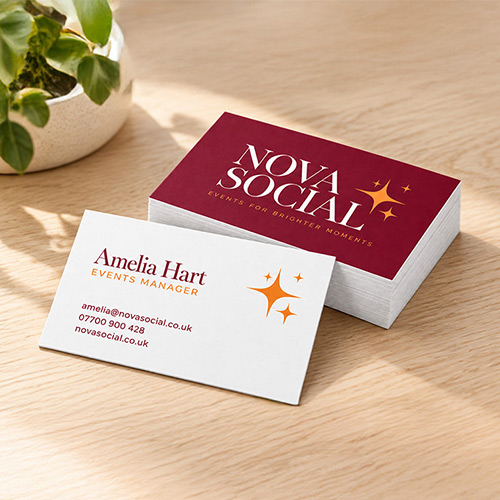
Straight corner business cards showing burgundy Nova Social branding and a white contact details reverse on a wooden desk.

FREE Delivery on orders over £75

From £7.79 for 25 — default options and most popular quantities shown; choose options to see live prices.

QTY
Same Day Express
Faster
Fast
25£10.89£8.56£7.79
50£11.02£8.66£8.27
100£11.12£8.74£8.35
250£17.61£13.85£13.22
500£22.16£17.43£16.64
1000£30.02£23.60£22.54
2000£42.60£33.49£31.98
2500£50.22£39.48£37.70

Price ex. VAT, excludes delivery

Multiple designs: If you want to print different designs, you'll need to add a quantity to your basket for each design.

Premium Business Cards

  • The classic business card size - 85mm x 55mm
  • Stand out with extra-thick luxury 450gsm Silk
  • Choose from crisp square cut or smooth rounded corners
Corner Type
Square CornersRounded Corners
Material
450gsm350gsm
Printed Sides
Single SidedDouble Sided
Lamination
No LaminationMattGlossVelvet
Embellishment
NoneSpot UVDouble Sided Spot UVGoldSilver

Product Overview

Premium Business Cards for Networking

Thick, Precision-Cut Business Cards in 450gsm Silk or 350gsm Uncoated

instantprint's Premium Business Cards are thick, standard-size cards for networking events, client meetings, appointment reminders and loyalty schemes. Hand one over and people notice the weight before they read your name. Choose silk with lamination or foil for a polished first impression, or uncoated card when clients need to jot down their next booking. Small enough for a wallet. Thick enough to stay out of the bin.

Premium Business Card Size, Paper, Finishes and Options

SizeWidth x height85 x 55mmStandard UK business card size
Paper
  • 450gsm silk: smooth with a subtle sheen
  • 350gsm uncoated: natural, textured feel and the easiest to write on
Lamination450gsm silk only
  • Matt
  • Gloss
  • Velvet
Embellishments450gsm silk with matt or velvet lamination
  • Spot UV: single or double sided
  • Gold foil: single sided only
  • Silver foil: single sided only
PrintingSingle or double sided
CornersSquare or rounded (6mm radius)
Multiple DesignsIf you want to print different designs, you'll need to add a quantity to your basket for each design.

Which Business Card Finish Should You Choose?

  • Matt lamination: a smooth, non-reflective finish for a clean, understated look. It isn't greaseproof, so keep it away from the chip shop.
  • Gloss lamination: a high-shine finish that makes colours and images pop. Ideal when your logo likes the limelight.
  • Velvet lamination: a soft-touch finish with a luxurious feel the moment someone picks the card up. Expect people to stroke it, then pretend they didn't.
  • Spot UV, gold foil or silver foil: choose 450gsm silk with matt or velvet lamination. Lamination first, sparkle second.
  • Cards you'll write on: choose 350gsm uncoated, as a ballpoint pen may smudge on silk and laminated cards. Ideal for appointment and loyalty cards.
instantprint 450gsm Premium Business Cards with matt lamination

FAQs

Premium Business Cards FAQs

Last updated

Which paper type should I choose?

instantprint prints Premium Business Cards on 2 stocks. certified silk is thick and smooth, with a sheen that keeps colours sharp. It's the only Premium stock you can laminate or add or to.

350gsm uncoated has a natural, textured feel and is fully writable and stampable, so it suits appointment and loyalty cards. Both stocks come in 85mm x 55mm with square or 6mm rounded corners.

What size are Premium Business Cards?

Premium Business Cards are 85mm x 55mm, the standard UK business card size, with square or 6mm rounded corners. Set up your artwork at 91mm x 61mm, which includes 3mm on every edge. instantprint doesn't offer custom sizes on Premium cards; for more space, choose Folded Business Cards instead.

What's the difference between matt, gloss and velvet lamination?

instantprint offers all 3 laminations on silk, and each adds durability. Matt gives a smooth, non-reflective look, though it isn't greaseproof. Gloss adds a high-shine finish that makes colours and photos stand out. Velvet has a soft-touch feel people notice when they pick the card up. To add or , choose matt or velvet.

Can I add Spot UV or foil, and what's the difference?

instantprint offers both on silk cards with matt or velvet . Spot UV is a clear, raised gloss layer you can feel, printed on 1 or both sides. Foil is real metallic gold or silver, pressed onto 1 side only. Choose Spot UV for a subtle, tactile highlight, and foil for a metallic effect that catches the light.

What's the best finish for a luxury business card?

For a luxury feel, choose silk with velvet , which has a soft-touch surface. Add gold or silver to 1 side for a metallic highlight, or on 1 or both sides for a raised gloss effect. Both need matt or velvet lamination. To compare finishes in your hands first, order a free instantprint sample pack.

Can I get rounded corners on my business cards?

instantprint offers rounded corners with a 6mm radius on both silk and 350gsm uncoated Premium Business Cards, single or double sided. Gold and silver are also available on rounded-corner cards. Rounded corners aren't available with the Next Day turnaround, so choose Faster or Fast when you need them.

How long will my Premium Business Cards take?

instantprint offers 3 turnarounds: Next Day, Faster (1 working day) and Fast (3 to 4 working days). Approve your artwork by the 5pm Next Day cut-off for delivery the next working day, or by the 6:30pm Faster or Fast cut-off for those turnarounds. Delivery dates count from when your is approved, and checkout shows the exact date before you pay.

Can I get business cards tomorrow?

instantprint delivers Premium Business Cards the next working day when you approve your artwork by the 5pm Next Day cut-off. Next Day covers 25 to 5000 cards on silk, single or double sided, with no or matt lamination and square corners. See Next Day Business Cards for the full details.

How much do Premium Business Cards cost?

The price of instantprint Premium Business Cards depends on 7 choices: quantity, stock, printed sides, , embellishment, corner type and turnaround. The more cards of 1 design you order, the less each card costs, from a minimum of 25. Prices in the table exclude VAT and delivery, and the basket shows the full total before you pay.

What's the minimum order for business cards?

The minimum order for instantprint Premium Business Cards is 25 cards per design, with no set-up fee. Single cards or test prints aren't available. To check stocks and finishes before you order, request a free sample pack, which shows silk, 350gsm uncoated, laminations, and side by side.

How thick are 450gsm business cards?

instantprint's 450gsm silk business cards are approximately 0.5mm thick. The 450gsm figure is the card's weight in grams per square metre, not its thickness, but heavier card is stiffer, so a 450gsm card holds its shape in a wallet. To feel the difference between 450gsm silk and 350gsm uncoated, order a free sample pack.

Can I write on Premium Business Cards?

You can write on all Premium Business Cards. 350gsm uncoated card is fully writable and stampable, so instantprint recommends it for appointment and loyalty cards. A ballpoint pen works on silk and laminated cards, but the ink may smudge. For stamp cards with rounded corners, see Loyalty Cards.

Can I order different designs in one order?

Add each design to your instantprint basket as a separate item, for example 1 per member of staff, each with a minimum of 25 cards. Bulk pricing applies to copies of the same design, not across different designs. Printing a different name or number on each card within 1 design, known as variable data printing, isn't available.

Can I get square business cards?

No. instantprint no longer prints square-shaped business cards. Premium Business Cards are 85mm x 55mm, the standard UK size, with square-cut or 6mm rounded corners. For a card that stands out at the standard size, add on 1 or both sides, or gold or silver on 1 side.

Do you offer embossing, custom sizes or other finishes?

instantprint doesn't offer embossing, debossing, custom sizes, die-cut shapes, plastic cards or metallic ink on business cards. For a raised, tactile finish, choose on 1 or both sides. For a metallic effect, choose gold or silver on 1 side. Both are available on silk with matt or velvet .

Can instantprint design my business cards?

instantprint doesn't offer a design service. You can create your card for free with the online design tool, starting from a ready-made template, or upload your own finished artwork as a PDF, including designs made in Canva. Every order includes a free artwork check before printing, and you approve a digital before anything goes to press.

How do I set up my business card artwork?

Supply a print-ready PDF in at , with fonts outlined or embedded. Set it up at 91mm x 61mm: that adds 3mm of bleed, extra background past each edge of the 85mm x 55mm card, so no white lines show after trimming. Keep text and logos inside the 3mm . instantprint checks every file free before printing.

How do I set up foil artwork for my business cards?

Supply your normal artwork plus a layer showing only the areas you want foiled, in a bright colour rather than black. Keep all foil at least 3mm from the edge of the 85mm x 55mm card and use a minimum font size of 8pt. instantprint's Foil Artwork Guide walks you through setup step by step.

Will I see a proof before my cards are printed?

instantprint shows you a digital of every order to check and approve before printing starts; physical proofs aren't available. Every order also includes a free artwork check. Delivery dates count from when you approve your proof, so approve it by the 5pm Next Day cut-off or the 6:30pm Faster or Fast cut-off.

How much is delivery?

instantprint calculates the delivery price in your basket, and standard delivery is free on orders over £75. Orders go by tracked delivery, with an upgrade to pre-noon delivery, and Saturday delivery is available for eligible orders when offered at checkout. Some postcodes in extended delivery areas take 1 extra working day; check yours on the Delivery & Turnaround page.

Can you deliver business cards outside the UK?

No. instantprint delivers to UK addresses only, so delivery to the Republic of Ireland, Europe or further afield, such as the UAE, isn't available. If you need cards for an overseas trip or event, have them delivered to a UK address before you travel, using the delivery date shown at checkout.

Do prices include VAT, and can I get a quote?

Prices in instantprint's price table exclude VAT and delivery, and the basket shows the full total before you pay. To get a quote, add your Premium Business Cards to the basket and use Save as Quote. Artwork can be uploaded later from the basket, so you don't need a finished design to save a quote.

How do I use a discount code?

Enter your discount code in the voucher field in your instantprint basket before you pay. First-order offers have eligibility rules and may exclude some products, so check the offer's terms if a code doesn't apply to your Premium Business Cards. Standard delivery is also free on orders over £75, with the delivery price calculated in the basket.

Can I recycle Premium Business Cards?

Unlaminated Premium Business Cards, on silk or 350gsm uncoated, can go in paper and card recycling, subject to your recycling provider. Laminated cards have a thin plastic film, so check whether your provider accepts them. instantprint's packaging is widely recyclable, including the plastic, and the card stock is certified.

Still not sure? Talk to our team on Live Chat. We can check your artwork, help you choose between stocks and finishes, or talk you through foil and Spot UV setup.

Chat to our team
{{FILL IN: descriptive alt text for the right-hand image}}

Artwork & Templates

Premium Business Card Artwork & Templates

Ordered these cards before? Skip the setup and reorder them in a few clicks from your account.

Create Your Design

How would you like to create your design?

Choose from PDF, InDesign, Photoshop or Illustrator templates.

Edit a ready-made business card design in your browser, or create your own from scratch.

How to startAdd your cards to the basket, then choose Customise a free template or Create your own design.

Set a custom size of 91 × 61mm.For a double-sided card, add a second page for the back. When you’re done:

  1. Click Share, then Download.
  2. Choose PDF Print as the file type.
  3. With a premium account, select . On a free account, use the digital option. Your colours will be converted for print and may look slightly different.

Check Your Print Specifications

For the best print result, use these specification guidelines:

Resolution
(150dpi minimum)
Print
Full colour
Colour
Format
PDF
Fonts
or
3mm

Upload and Approve

Made your own file? We recommend saving it as a PDF (other are accepted), add your cards to the basket and upload it (a two-page PDF if your cards are double-sided), then check and approve your .

Designed online with us? Your design is added to your order automatically, so you just need to check and approve your .

Approve by 6:30pm for Fast and Faster options.

Free Artwork Check on Every Order

Our studio team checks your file before it’s printed, and can add if you’ve forgotten it.

Artwork Questions

Can you check my artwork before I order?

Yes. Upload your file to our live chat before you order, and we’ll check it and let you know if it’s right.

Which file type should I upload?

We accept PDF, JPEG, PNG, PSD and AI files, including designs exported from Canva. A PDF gives the most reliable result, so we recommend it even if you designed in Photoshop or Illustrator. Other file types can cause problems with fonts, colours or image quality.

Add your cards to the basket, then upload your file and check your before you approve it.

Should my file be RGB or CMYK?

We print in . Canva, Figma and most screens use , so bright colours can look slightly different in print.

Export in CMYK where your software allows. In Canva, you can choose CMYK when downloading as PDF Print on a premium account. In Photoshop, convert under Image > Mode > CMYK Color.

What resolution and pixel size do I need?

At least at full printed size, or 300dpi for the sharpest detail. For an 85 × 55mm card, that’s 502 × 325 pixels at 150dpi, or 1,004 × 650 pixels at 300dpi.

Changing the dpi setting on a small image won’t add detail.

How do I add bleed in Canva or Photoshop?

Add 3mm on every side and extend your background right to the edge. In Canva or Photoshop, set up your document at 91 × 61mm, which already includes the bleed.

Keep text and logos 6mm in from the edge of that document, so they sit inside the . If you forget the bleed, our studio team can add it for you.

Can I upload different designs in one order?

Yes. Add each design to your basket as a separate item, for example one per member of staff, and upload its file there.

How do I set up Spot UV or foil artwork?

and need extra artwork that marks only the areas you want finished. The Foil & Spot UV section on this page explains exactly how to set it up.

Can I add a QR code?

Yes. Make it at least 25mm (1 inch) square at print size and keep it inside the . Test it by scanning your on screen before you approve it.

How do I set up a double-sided card?

Upload one two-page PDF, with the front as page 1 and the back as page 2. Set up both pages at 91 × 61mm, including 3mm .

How do I export from Canva, Figma or Illustrator?

In Canva, click Share, then Download, and choose PDF Print. Select if you have a premium account. A PNG will work, but PDF is better.

In Figma, export a PDF at your template size including . In Illustrator, save a print-quality PDF with bleed and fonts .

Foil & Spot UV

Foil and Spot UV Embellishment Guide

Make Details Shine

Add or to highlight part of your business card, such as your logo, name or a pattern. Embellishment is only available with matt or velvet .

Foil

Metallic shine

Gives your chosen areas a reflective metallic finish that catches the light.

Read the foil artwork guide

Spot UV

Clear gloss

Adds a clear, glossy coating that stands out against the soft matt or velvet finish around it.

Read the spot UV artwork guide

How to Set Up Your Artwork

Upload 2 files: your finished design, and a separate embellishment file showing only the areas you want embellished.

Your DesignDesign.pdf
Embellishment FileFoil.pdf
Printed ResultFoil on logo and name
  1. Create a copy of your finished design at the same size, so the embellished areas line up exactly.
  2. Fill the areas you want embellished in bright orange and delete everything else, leaving the background transparent.
  3. Name the file after your finish, such as Foil.pdf.
  4. Upload both files: your finished design and your embellishment file.

Before You Upload

Edges and FoldsKeep embellishment at least 3mm from the edge and away from folds.
Text SizeMake embellished text at least .
Embellishment FileBright orange areas only, on a transparent background.
LaminationMatt or velvet only.
Check your before printing. It shows the embellishment layer on its own and over your design, so you can see exactly where it will go.

Not Sure Your File Is Right? Talk to our team on Live Chat. We can check your embellishment file before you order.

Chat to our team
Foil and spot UV embellishment example

Delivery

Premium Business Card Delivery

When Will My Business Cards Arrive?

Choose a turnaround when you order. The delivery date shown next to each option already includes printing and delivery. Working days are Monday to Friday, excluding bank holidays. If you approve your artwork after the cut-off, your delivery date moves back.

Faster

Printed in 1 working day

Order and approve your artwork before 6:30pm. We'll print your cards in 1 working day, then deliver them the next working day.

Fast

Printed in 4 working days

Order and approve your artwork before 6:30pm. We'll print your cards in 4 working days, then deliver them the next working day.

Check the delivery date shown before you pay.

Extended areas: some UK postcodes are extended areas and will take one extra working day. You can check this at checkout.

Delivery Prices

Delivery is calculated in your basket and depends on the product and quantity you order. Every order is delivered by our delivery partners, and once it's been dispatched you'll receive an email with tracking details.

Free Standard Delivery on Orders Over £75

Spend £75 or more and your standard delivery is on us.

Delivery Questions

Can I get business cards delivered tomorrow?

Yes. instantprint offers next working day delivery on Premium Business Cards when you choose Next Day and order and approve your before 5pm, subject to your postcode and available options.

Next Day means your cards are printed and dispatched that day, not delivered that day. It's available on square corners only, so rounded-corner cards need Faster or Fast. Uploading artwork without approving the proof doesn't meet the deadline.

Do the print times include delivery, and can I get Saturday delivery?

No. The print time for each turnaround covers production only: same day for Next Day, 1 working day for Faster and 4 working days for Fast. Delivery is the next working day after printing, so use the delivery date shown when you order rather than counting print days.

Saturday delivery is available for eligible orders when offered at checkout. A Friday order doesn't automatically qualify. Extended areas will take one extra working day, and bank holidays can also affect arrival dates. You can check your delivery date at checkout.

Can you deliver business cards to my event venue or overseas?

instantprint delivers to eligible UK addresses, including event venues that accept courier deliveries. Choose a delivery date at least one working day before your event, confirm the venue can accept parcels on that day and during its receiving hours, and include its required company, event or stand details in the delivery address.

Direct international delivery isn't offered. If arranging onward transport yourself, ask live chat about packed dimensions, weight and any product information needed for customs before booking a courier.

Can I send my business card order to more than one address?

Yes. instantprint's Split Delivery sends one order to two or more UK addresses, with the quantity of each product divided between them. Choose it in your basket, then either add your addresses and pay at checkout, or reserve it and finish setting it up later in My Orders. A reserved order doesn't go into production until the setup is completed and paid.

Split Delivery covers your whole order, and the fee is based on how many boxes go to each address. It's charged on top of your order and isn't covered by free delivery on orders over £75. You'll see the cost before you pay. Split Delivery adds extra delivery time, including on Next Day orders, because split orders are sent through our distribution centre, so check the estimated delivery date in your basket. You can't change addresses or quantities yourself once you've paid, so check your list before confirming.

Reviews

What Customers Say About our Premium Business Cards

Summary of Premium Business Cards Reviews

Ten of the 13 business card reviews from the past year give five stars, praising sharp print, card quality and fast delivery, including one urgent order uploaded at 2pm on a Friday that arrived by midday on Saturday. Where customers did report a problem, it was usually a print fault such as off-centre printing or mottling, and several said the team replaced the cards quickly.


How Businesses Use our Premium Business Cards

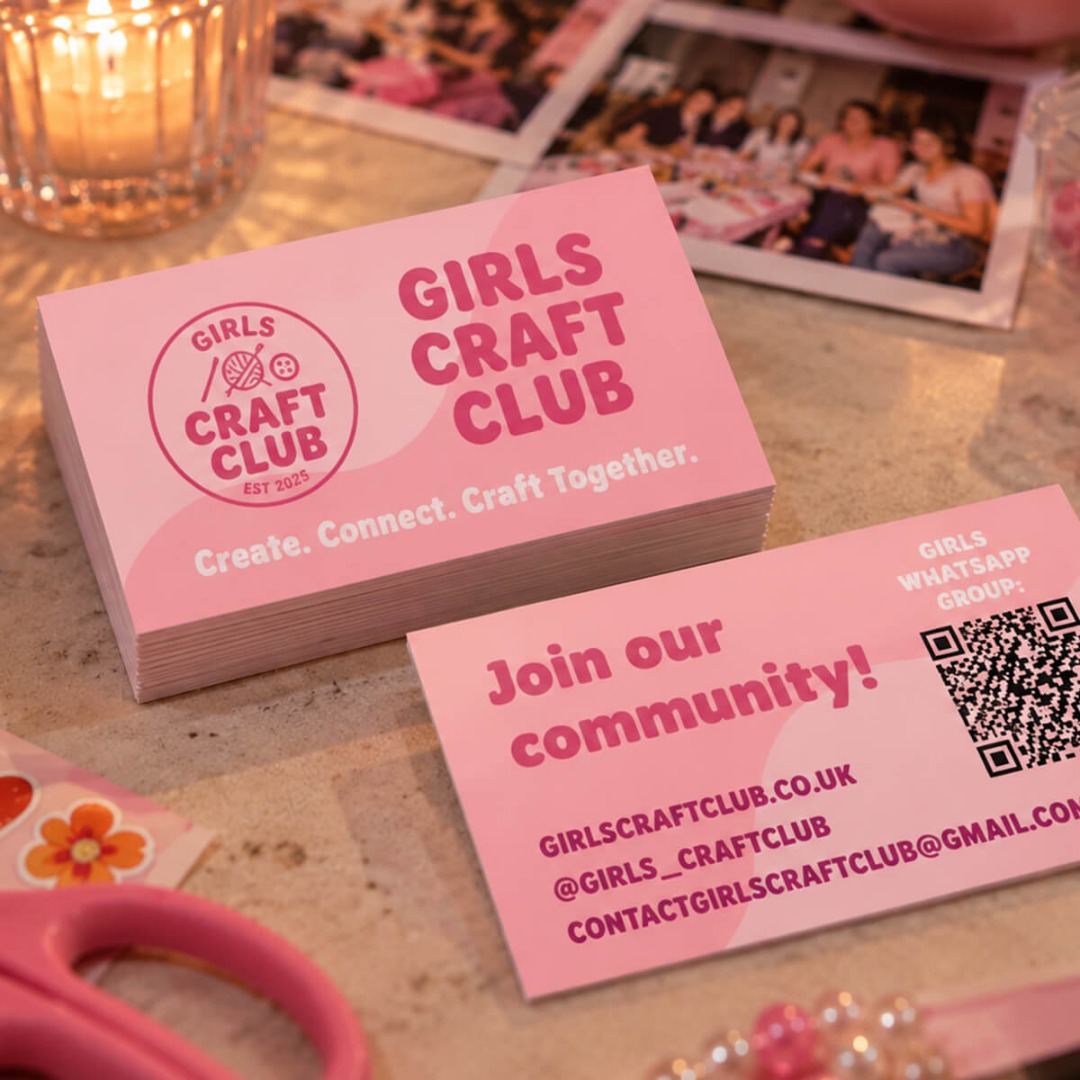
How Girls Craft Club Uses Premium Business Cards for Networking

“I absolutely love the velvet touch finish with UV spot on my cards and I’ve had so many comments on how luxurious and memorable they feel.”

Gabrielle Pacitti, Founder, Girls Craft Club
Material
Velvet lamination with Spot UV
Used for
Networking and partnerships

Why they chose us: Gabrielle has used instantprint across three business ventures since 2014, and says the quality is reliable, ordering is easy and the results are consistently professional.

Read the full case study
Gabrielle Pacitti of Girls Craft Club

Peak District Yarns Client Spotlight

Carrie Waugh, owner of Peak District Yarns, explains how she uses business cards alongside product labels, knitting patterns and exhibition banners to promote her hand-dyed yarns in-store and at yarn festivals across the UK.

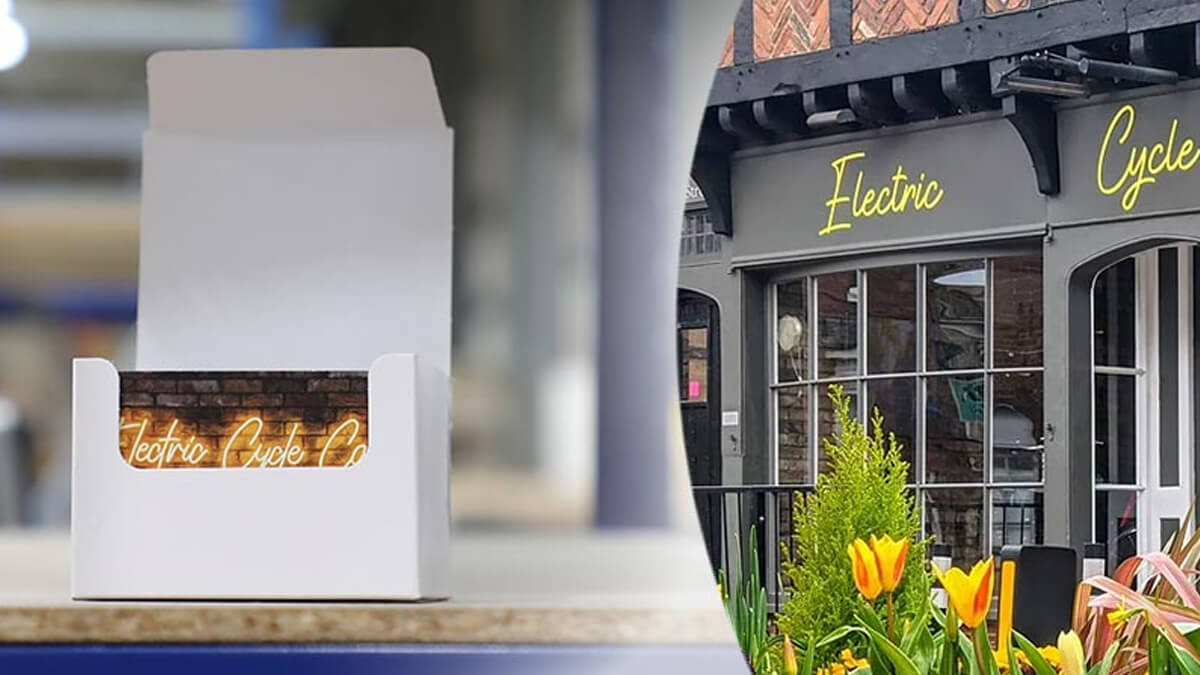
Electric Cycle Café in Farnham, Surrey

How Electric Cycle Café Uses Premium Business Cards as Loyalty Cards

Electric Cycle Café, an ebike shop and café in Farnham, ordered 500 business cards on 450gsm silk to use as loyalty cards, giving customers their ninth drink free.

Read the case study