A good NCR pad makes paperwork feel a little less like paperwork. Whether you’re recording a delivery, writing a receipt or getting a job signed off, it gives everyone the details they need without having to write them out twice.
So, what should you include on your NCR pads? Start with your business details, the date, a reference number and space for the information you need to record. Then add any useful extras, such as pricing, signatures or delivery details, depending on how you’ll use the form.
The trick is to make every part of the page earn its place. Let’s get into it.
Table Of Contents
- What Is an NCR Pad?
- What Should You Include on an NCR Pad?
- What to Include for Different Types of NCR Forms
- How to Make Your NCR Pad Easy to Use
- How Many Copies Do You Need?
What Is an NCR Pad?
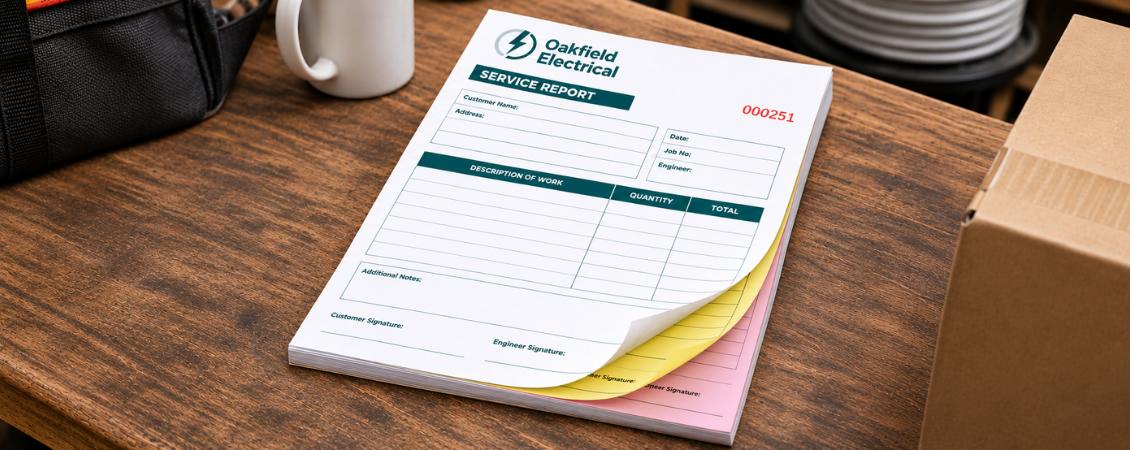
NCR stands for “No Carbon Required”. An NCR pad uses specially coated paper to create copies when you write on the top sheet, without a separate piece of carbon paper.
Each form comes as a set of sheets. Write on the top one and the information transfers to the sheets underneath, leaving you with copies to share or keep for your records.
They’re useful wherever you need a quick paper record, from a delivery at a busy shop to a completed job at a customer’s home.
What Should You Include on an NCR Pad?
Every business works a little differently, but there are a few details that make most NCR forms easier to fill in, understand and keep track of.
Your Business Name and Contact Details
Start with the basics: your business name and the contact details someone might need after receiving their copy. A phone number, email address or website can make it easy for a customer to get in touch about a job, order or payment.
Your logo can sit alongside these details to make the form recognisably yours. It doesn’t need to take over the page, though. Save plenty of room for the information you’ll be writing in.
A Clear Form Title
It sounds simple, but a title tells everyone what they’re looking at straight away. “Invoice”, “Delivery Note”, “Receipt” or “Job Sheet” are all much clearer than leaving someone to work it out from the contents.
If you use several kinds of paperwork, consistent titles can also help your team find the right pad when they need it.
The Date
Add a clearly labelled space for the date. Depending on the form, you might need more than one: a job sheet could include both the date work was requested and the date it was completed, for example.
Think about which dates you actually refer back to, then give each one its own field.
A Reference Number
A reference number makes it easier to match a customer’s copy with your own records. It can be especially handy when you’re looking for an order, checking an invoice or answering a question about a delivery.
Sequential numbering gives each form its own number, so you don’t have to add one by hand. Leave it somewhere easy to spot, such as near the top of the page.
Customer Details
Include enough space for the details you’ll need to identify the customer or organisation. Depending on the form, that could be a name, business name, address, phone number or email address.
Only ask for information that’s useful for the task. A short collection slip might just need a name and order number, while a delivery note may need a full delivery address too.
Space for the Main Details
This is where your NCR form does the heavy lifting. Leave room to describe the goods, services, work or payment being recorded.
A simple table can help keep things tidy. For an order form, you might use columns for item description, quantity and price. For a job sheet, larger blank areas may be more useful for notes about the work carried out.
Think about the longest description you’re likely to write, not just the shortest. A little extra writing space now can save a lot of squeezing later.
Signatures and Names
If you need someone to confirm that goods have been received or work has been completed, include a signature box. It’s also helpful to leave space for a printed name and the date, so you can tell who signed and when.
Make the purpose clear with a label such as “Received by” or “Work completed by”. That way, everyone knows what they’re signing for.
Payment Details and Terms
For invoices or payment-related forms, consider fields for the amount due, payment method, due date and any relevant payment terms.
The details required can vary depending on your business and the type of document. Check the GOV.UK guidance on invoicing before finalising an invoice, including any VAT requirements that apply to you.
What to Include for Different Types of NCR Forms
Not every form needs every field. Here’s how to tailor your layout to the job at hand.
NCR Invoice Pads
An invoice needs to make it clear who’s being charged, what they’re being charged for and how much is due. Alongside your business and customer details, leave room for an invoice number, dates, a description of the goods or services and the amounts.
Include payment information and any other details required for your business. If you’re VAT registered, check the relevant requirements before designing your form.
NCR Receipt Pads
A receipt is a record of a payment already made. Keep it straightforward with space for the date, customer name, amount received, what the payment was for and payment method.
A reference number can make it easier to find the matching record later, especially if you issue lots of receipts.
NCR Delivery Notes
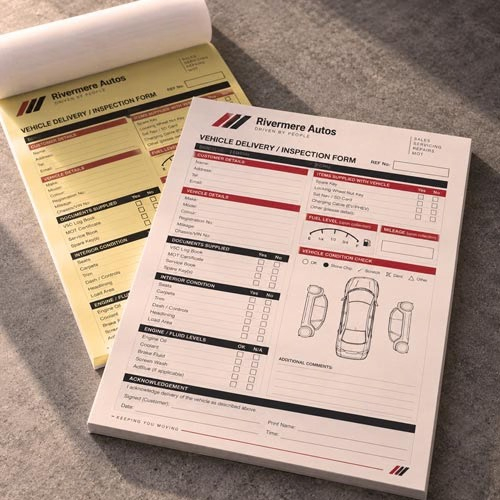
For a delivery note, focus on what’s being delivered and where it’s going. Include fields for the recipient’s name and address, delivery date, order reference and a list of items and quantities.
A “Received by” signature and printed name can also be useful when you need a record of who accepted the delivery. Leave room for any missing items or delivery notes too.
NCR Job Sheets
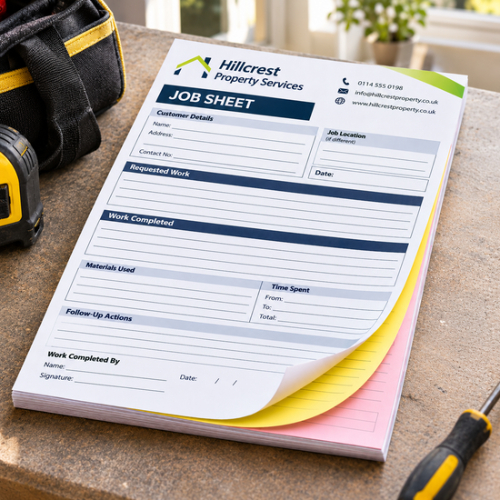
A job sheet should give you a clear record of the work. Include the customer’s details, job location, date and a description of the work requested or completed.
Depending on what you do, you might also need space for materials used, time spent, follow-up actions and signatures. A generous notes section is particularly useful when every job is a little different.
How to Make Your NCR Pad Easy to Use
Once you know what needs to go on your form, think about how it’ll feel to fill in. Will someone be writing at a desk, on a counter or while standing on site? The best-looking layout won’t help much if there’s nowhere to rest a hand or fit an address.
Group related information together and use clear labels. Give frequently used fields enough space, and keep printed text and lines easy to read against the paper. Before placing an order, print a sample at its actual size and fill it in by hand. You’ll quickly spot any boxes that are too small or questions you’ve forgotten to ask.
It’s also worth checking which copy goes where. You might label copies for the customer, office or another team member so everyone knows which sheet to take.
How Many Copies Do You Need?
The number of parts refers to the total sheets in each set, including the top sheet:
- Duplicate, or 2-part: one original and one copy.
- Triplicate, or 3-part: one original and two copies.
- Quadruplicate, or 4-part: one original and three copies.
Think about everyone who needs a record. A customer and a business might be happy with two parts, while a delivery involving a customer, driver and office could benefit from three.
Whichever layout you choose, keep it practical: the right NCR pad is the one that captures what you need, gives everyone their copy and makes the next bit of your day that little bit easier.
.jpg)

.jpg)